Agent Studio
OVERVIEW
What is an Agent Studio?
An AI agent studio is where a process your team runs by hand becomes an agent that runs it for you. You describe the job in plain language - who can ask for this, what has to be checked, what happens next - and the builder produces an agent that plans the steps, calls the systems involved, and knows when to stop and ask a person.
Harmony covers both ends of that. A library of pre-built agents handles the processes every IT team shares: onboarding and offboarding, password and MFA resets, application access requests, license expiry, low storage and end-of-life hardware. The visual Custom Workflow Builder handles everything specific to you, with manual, scheduled, event and webhook triggers, If/Else branching, For Each loops over up to 20 parallel items, and durable sleep timers that survive a restart.
Every agent inherits the platform’s guardrails - your approval policies, identity-provider-backed access, scoped permissions and a step-by-step audit log of each run - and can be simulated in a sandbox, released to one team first, versioned and rolled back in a click.
Harmony Genie, our AI assistant, can create and change agents for you in plain English, and open the Agent Studio when you want finer control.
USE CASES
How the Agent Studio helps your teams
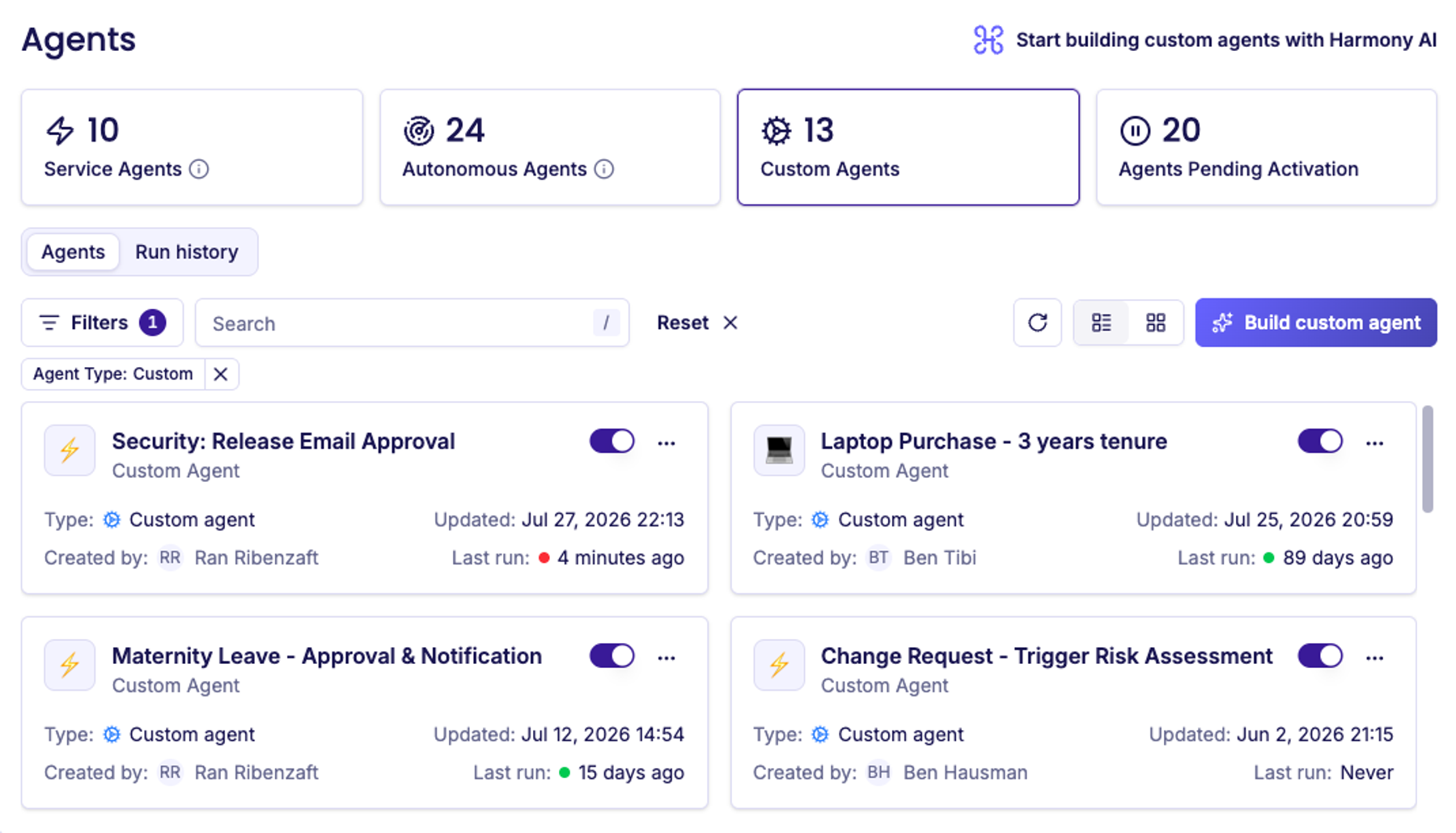
Enterprise workflow agents
Build specialized agents for every department, from IT support, access approval, and knowledge assistance to finance requests and procurement
Cross-system agents
Orchestrate actions across ITSM, HRIS, identity providers, SaaS applications, databases, and internal tools
Autonomous execution
Build agents that plan, reason, and execute multi-step workflows, not just answer questions
Enterprise integrations
Connect agents to any API, MCP server, webhook, database, SaaS application, or custom action
Controlled rollout
Test new agent capabilities with specific teams before company-wide deployment
Human escalation
Seamlessly hand off conversations or actions to people when needed
KEY BENEFITS
From process to production agent in minutes
No Code
Simple building experience: business teams build and iterate on AI agents without engineering
Deploy Everywhere
Build once, deploy everywhere: agents work across every communication tool, or autonomously in the background
Shared Memory
Shared enterprise memory: every agent operates with a consistent understanding of your organization’s knowledge, policies, and context
Guardrails Built In
Enterprise-grade guardrails: every agent inherits your approval policies, access controls, and audit requirements
Live In Minutes
Production-ready in minutes: from first build to production
CAPABILITIES
Powerful capabilities built for enterprise IT
Intent-driven LLM builder
Describe the agent in natural language
Enterprise knowledge grounding
Combine documentation, APIs, databases, SaaS apps, and MCP servers into a single reasoning layer
Guardrail configuration
Define permissions, escalation rules, approval policies, and operational boundaries
Template library
Pre-built agents for common use cases across departments
Testing sandbox and simulations
Run simulated conversations before going live
Agent analytics
Measure usage, success rates, resolution rates, and business impact
Versioning and rollback
Safely iterate on agents with version control and one-click rollback
HOW IT WORKS
How the Agent Studio works
You have a process that runs on tribal knowledge: a runbook, a spreadsheet, or a person everyone messages.
- 1
Describe the agent
Write what it should do in natural language, or start from a template in the library. The builder turns the description into a configured agent with its trigger, inputs and steps laid out for review.
- 2
Connect the systems it needs
Point it at the systems that hold the truth and take the action: identity providers, HRIS, MDM, ITSM, databases, SaaS applications, any HTTP-accessible API, MCP servers and webhooks.
- 3
Set the guardrails
Define who can trigger it, which approvals apply, what it may and may not touch, and when it escalates. Guardrails come from the policies you already maintain instead of being rewritten per agent.
- 4
Test before it goes live
Run simulated conversations and dry runs in the sandbox, then release the agent to one team or department to prove it against real requests before company-wide rollout.
- 5
Deploy, measure, iterate
The agent runs in Slack, Teams, email and the portal, or silently in the background on a schedule. Analytics show usage, success and resolution rates, and version control lets you change it safely.
A process that used to depend on someone remembering it now runs on its own, with every run logged and reversible.
SEE IT
Describe the flow once. Access just happens.
Every AI tool has its own access policy. Here, IT writes the whole process in one paragraph, and the Agent Studio builds the agent: the trigger, the approvals, the groups, the expiry, and even a token-limit flow.
IN PRODUCTION
What running AI agents actually looks like
Marcè Ayala, Senior Manager of IT Infrastructure at Mammoth Brands, opens up their live Harmony workspace and shows how the team audits its agents. That means checking which runs succeeded, which failed and why, and the run log that proves a request was handled today.
“I go back and look at the success rate of each agent.”
Fireblocks built a production access agent in 2 days
Fireblocks runs 24 agents on Harmony, many of them built by its own IT and security team. One went from a spec written in Slack to a production application-access agent in two days and has since completed 269 runs. Across the platform, agents have processed 915 application access requests, and a third of 4,800+ employee conversations resolve with no ticket at all.
“Harmony took over all of our simple tickets. My team doesn’t see them anymore, and the engineers finally spend their day on the work that actually needs them.”
COMPARISON
Building agents in Harmony vs. scripts and point automations
Most IT teams already automate. The question is what it costs to build, change and trust each automation.
| Scripts and point automations | Harmony Agent Studio | |
|---|---|---|
| Who can build | Engineers, or whoever wrote the original script | IT, HR and finance teams, in natural language, with no code |
| Time to production | Weeks of scoping, coding and review | Minutes to a first version; Fireblocks shipped a production agent in two days |
| Guardrails | Written into each script, and different in every one | Inherited from your approval policies, access controls and audit requirements |
| Reach | One system per script, glued together with cron | Any API, MCP server, webhook, database or SaaS app, orchestrated in one run |
| Testing | In production, on real employees | Sandbox simulations, then a controlled rollout to a single team |
| Change management | Someone edits the script and hopes | Versioning, one-click rollback and analytics per agent |
| Where it runs | A backend job nobody sees | In Slack, Teams, email and the portal, or headless in the background |
RELATED INTEGRATIONS
Give your agents the systems they need to act in


FAQ
Harmony’s Agent Studio lets IT teams build, configure, and deploy autonomous AI agents and custom workflow automations without writing code, in natural language, combining a library of pre-built agents for common IT use cases with a visual workflow builder for any connected system.
Ready to build your agentic service desk?
See agents resolving your own tickets in a 30-minute session. No slides.